Automation in Email Marketing: Flows That Get Replies
Email automation has a reputation problem. Many local businesses hear “automated emails” and picture generic drip campaigns that get ignored. In reality, automation in email marketing can be the most reliable way to start real conversations, if the flows are designed around one outcome: a human reply.
Replies happen when timing, relevance, and a clear next step align. This guide breaks down the exact flows that consistently generate responses for local businesses, agencies, and B2B teams, plus practical templates you can adapt today.
What “reply-first” automation actually means
Most automated email programs are built to “nurture” in a vague way: send content, hope the lead clicks, and wait. Reply-first flows are different. They are designed to:
- Trigger at the moment intent is highest
- Ask one simple question that is easy to answer
- Route the reply to the right person fast (sales, owner, support)
- Keep follow-ups short, helpful, and specific
If you sell a service (roofing, dental, legal, home services, B2B consulting, travel, agencies), a reply is often more valuable than a click because it moves the lead into a real sales process.
The foundation: deliverability and trust signals (so your flows are even seen)
Before you optimize copy, make sure your automation infrastructure supports inbox placement and trust.
At a minimum:
- Authenticate sending domains with SPF, DKIM, and DMARC (Google and Microsoft both emphasize authentication for reliable delivery).
- Keep your list clean (remove hard bounces, suppress chronic non-openers over time).
- Use consistent “from” names and avoid sudden volume spikes.
- Make your emails look like emails from a real business: a plain-text style is often fine, but include a physical address and unsubscribe options where required.
For compliance, most local businesses should assume they need to meet GDPR principles for EU/EEA contacts (including Norway) and CAN-SPAM requirements for the US. If you do any prospecting beyond opt-in, get legal guidance and separate those systems from your customer marketing.
The 7 automation flows that reliably get replies
These are the highest leverage flows for service-based local businesses. You do not need all seven. Start with two or three and improve them.
1) “Speed-to-lead” flow for contact forms (the fastest win)
Trigger: Someone submits a contact form, quote request, or “request callback.”
Most businesses respond too slowly. A fast, human-sounding email that asks one question will often outperform a polished brochure-style response.
Email 1 (send within 1 to 3 minutes):
- Subject:
Quick question about your request - Body (example):
Hi {{first_name}},
Thanks for reaching out about {{service}}. Before I point you to the right option, can I ask one quick question?
What’s the main goal you want to achieve by {{date/timeframe}}?
If it’s easier, reply with 1 sentence.
Best, {{sender_name}}
Why it works: It is easy to answer, and it positions your business as consultative.
2) “Lead magnet to meeting” flow (for SEO and paid leads)
Trigger: Downloaded a guide, requested pricing, booked a free assessment, or subscribed.
The mistake here is over-teaching. Instead, give one useful resource, then ask a question that naturally leads to a call.
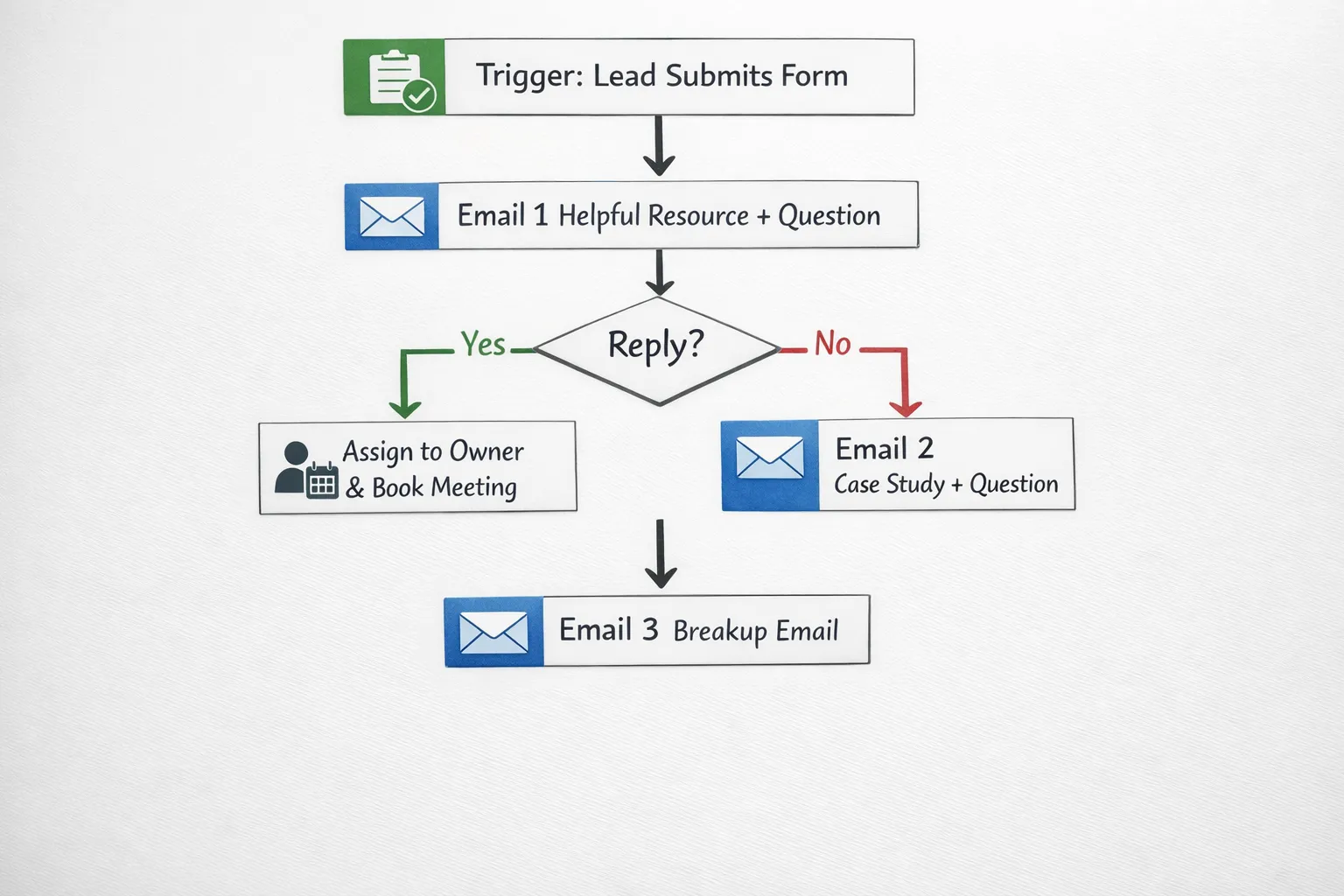
Flow structure:
- Email 1: Deliver the resource, ask a simple diagnostic question.
- Email 2 (1 to 2 days later): Share a short case outcome, ask if they want the same result.
- Email 3 (3 to 5 days later): Offer two meeting times, or ask if they want a recommendation by email.
Keep each email focused on one action: replying.
3) “Unfinished booking” flow (when someone starts but does not schedule)
Trigger: Clicked “Book a call” but did not complete scheduling, or opened scheduling page twice.
This flow works well if you route leads to Calendly or a similar booking tool.
Email 1 (after 2 to 4 hours):
- Subject:
Want me to hold a slot? - Question: “Do you prefer mornings or afternoons?”
Email 2 (next day):
- Add one line of reassurance: “If you’re not ready for a call, reply with your situation and I’ll point you in the right direction.”
This converts “not ready” leads into replies you can qualify.
4) “Quote follow-up” flow (the anti-ghosting sequence)
Trigger: A quote/proposal was sent.
For local services, the quote stage is where deals stall. Automate it.
Suggested sequence:
- Day 1: “Any questions I can answer before you decide?”
- Day 3: “Most clients compare us against X. What are you using to decide?”
- Day 7: “Should I keep this quote open, or close it for now?”
That last one is a classic “permission to close” question that often triggers a response.
5) Post-service review and referral flow (turn happy customers into replies)
Trigger: Job completed, invoice paid, or project marked done.
The goal is not “please leave a review” only. The goal is a reply that reveals satisfaction, objections, and referral opportunities.
Email 1 (1 to 2 days after completion):
- Ask: “On a scale of 1 to 10, how did we do?”
If they reply 9 or 10, your next automated email can ask for a Google review. If they reply lower, route it to the owner for recovery.
6) Reactivation flow (for old leads and past customers)
Trigger: No activity for 90 to 180 days, or a past customer has not booked again.
Keep it simple and honest.
Email example:
- Subject:
Still a priority in 2026? - Body: “We helped you with {{past_service}} last time. Is {{problem}} something you still want to improve this quarter, or should I stop reaching out?”
This often produces clean “yes,” “later,” or “not anymore” replies, which improves list quality and pipeline clarity.
7) Payment and onboarding flow (reduce friction and spark replies)
Trigger: Deposit required, invoice sent, or onboarding started.
For service businesses, payment is not just operations, it is also a trust moment. Use automation to remove confusion and prompt questions.
Email 1: Confirm what happens next, and ask: “Is there anything that could delay kickoff on your side?”
Email 2 (if unpaid after X days): Offer help, not pressure: “Do you need me to resend the link, change payer details, or split the payment?”
If you operate in travel or sell travel-related services, payment flows can get complex (cards, SEPA, reconciliation, fraud prevention). In that case, it can be worth looking at an all-in-one travel payments platform that centralizes methods and simplifies back office steps, so your customer emails stay clear and confidence-building.
A practical blueprint: build one reply-generating flow in a day
If you want a fast implementation that works for most local businesses, start with the contact-form flow and add two follow-ups.
Step 1: Choose one primary reply question
Good reply questions are specific and low effort. Examples:
- “What’s your timeline for getting this done?”
- “Which option matters more, fastest turnaround or lowest cost?”
- “Are you looking for help once, or ongoing?”
Avoid questions that require paragraphs.
Step 2: Add lightweight personalization (without over-engineering)
You do not need deep AI personalization to get replies. Start with:
- Service/category requested
- City or area served
- The exact form field they submitted (budget, urgency, preferred contact)
Then write the email so it sounds like a real person typed it.
Step 3: Route replies immediately
A fast reply to a reply is where revenue happens.
Operationally, your flow should:
- Forward or assign replies to the right teammate
- Tag the lead status in your CRM
- Trigger a “book a meeting” prompt only after they respond (to avoid pushing too early)
Step 4: Keep follow-ups short and spaced
Follow-ups should not add more content. They should increase clarity.
A simple cadence:
- Email 1: 1 to 3 minutes after trigger
- Email 2: next business day
- Email 3: 3 to 5 business days later
KPIs that matter for reply-first email automation
Open rates can be misleading (especially with modern privacy changes). Track what drives pipeline.
| Metric | What it tells you | What to optimize if low |
|---|---|---|
| Reply rate | Message relevance and clarity | Question quality, targeting, timing |
| Positive reply rate | Commercial intent | Offer framing, qualification, audience match |
| Meeting booked rate | Handoff and scheduling friction | Calendar routing, speed-to-lead, reminders |
| Time-to-first-response | Operational performance | Notifications, ownership, SLA |
| Lead-to-opportunity rate | End-to-end fit | ICP definition, landing page promise vs reality |
Common mistakes that kill replies (and how to fix them)
You ask for too much too soon
If the first email asks them to “book a 30-minute call,” many will ignore it. A one-sentence reply is easier than a calendar commitment.
Your emails read like marketing copy
Reply-first automation works best when the email feels personal and practical. Use:
- Short sentences
- One question
- Minimal links
Your flow ignores the customer’s context
A lead who requested “emergency service” should not receive the same sequence as someone downloading a long-term planning guide. Segment by intent.
You do not close the loop
If someone replies and no one responds quickly, your automation created work without revenue. Build ownership and response time into the system.
Frequently Asked Questions
What is automation in email marketing? Automation in email marketing is the use of triggers and workflows to send relevant emails automatically based on actions (like form submissions, bookings, purchases, or inactivity). The best automations are designed around a clear outcome, such as getting a reply, booking a meeting, or completing onboarding.
Which email flow should a local business set up first? Start with a contact form or quote-request flow because the intent is highest and the impact is immediate. A fast first email plus two short follow-ups can lift reply rates without increasing manual workload.
How many follow-up emails are too many? For most service businesses, 2 to 3 follow-ups after the initial email is a practical limit. If your emails are helpful, targeted, and spaced over several business days, you can follow up without sounding spammy.
Do automated emails hurt deliverability? Automation itself does not hurt deliverability. Poor list hygiene, missing authentication (SPF/DKIM/DMARC), sending to uninterested recipients, or sudden volume spikes are common causes of deliverability issues.
Should I optimize for opens or replies? If your goal is sales conversations, optimize for replies and booked meetings. Opens can be useful as a diagnostic, but they are not a reliable indicator of revenue, especially with email privacy changes.
Build email automations that book meetings, not just send emails
If you want these flows implemented end-to-end (from ICP and messaging to deliverability, meeting booking, routing, and ongoing optimization), Kvitberg Marketing builds outbound and conversion systems designed to generate qualified replies without spamming prospects.
Learn more at Kvitberg Marketing, and get a system that turns email automation into predictable conversations and booked meetings.