Email Automation: The Core Flows Every B2B Team Needs

Email is still one of the few channels you truly own. Ads get more expensive, algorithms change, and SEO takes time, but the right email automation keeps converting leads you already paid (or worked) to acquire.
The catch is that most B2B teams automate the wrong things. They send newsletters first, and build lifecycle flows later. The result is a list that grows, but revenue does not.
Below are the core automated email flows that consistently move B2B buyers from “interested” to “ready to talk,” plus the triggers, structure, and KPIs that matter.
What “core flows” means in B2B email automation
Core flows are lifecycle sequences that:
- Trigger from a buyer action (form submit, demo request, quote request, webinar signup, trial start, inactivity)
- Deliver a small set of messages with a single job (convert, activate, retain)
- Improve over time with clear measurement
They are different from one-off campaigns (like a product announcement) because they run continuously and compound.
A good way to think about it is: campaigns create spikes, automation creates a baseline.
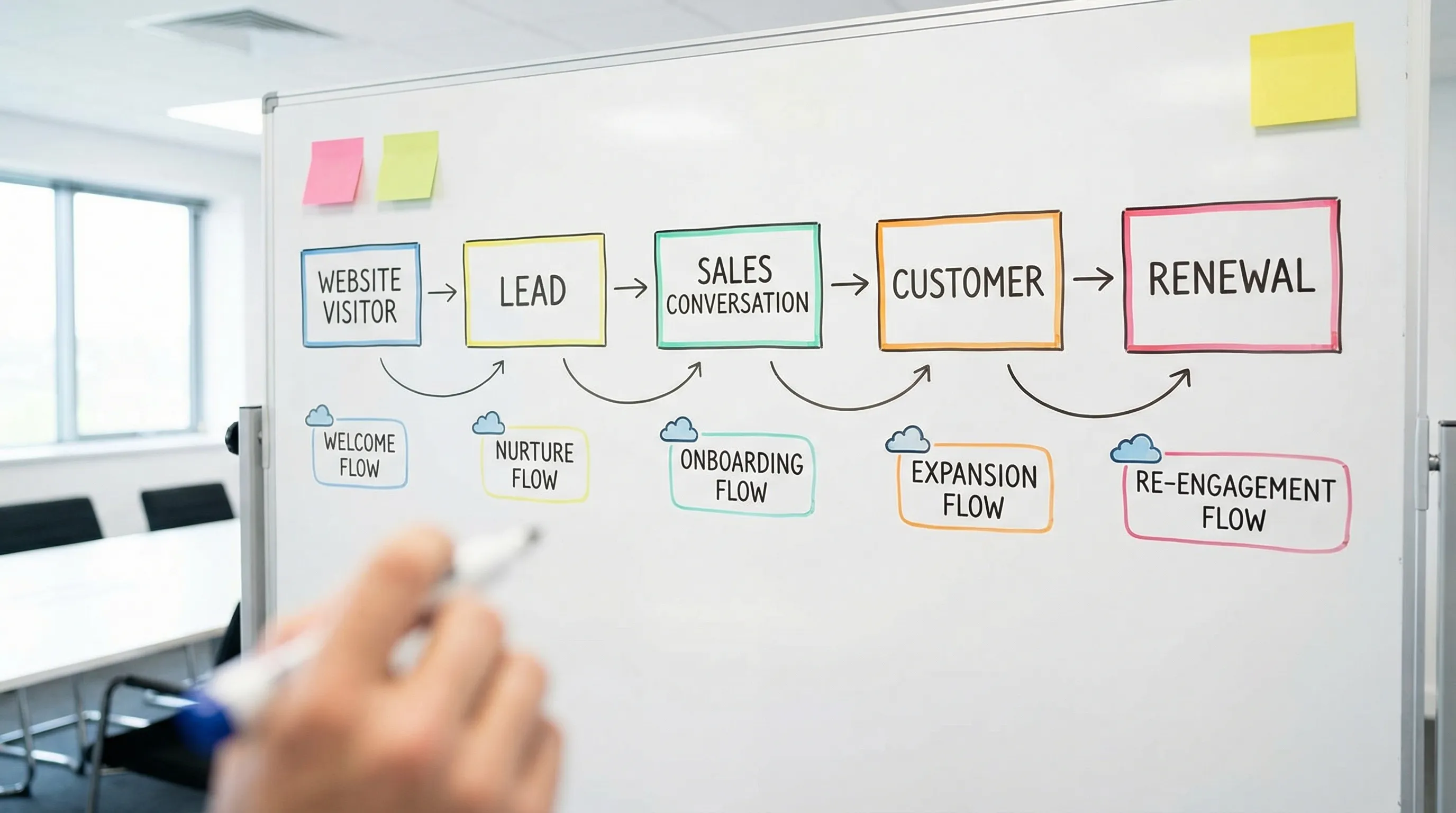
Before you build: the foundation that makes flows work
Most automation “fails” because the basics are missing. Fix these first and every flow performs better.
1) One primary conversion event per stage
For many B2B and local service businesses, the primary events are straightforward:
- Lead stage: “Request a quote,” “Book a consultation,” “Download the guide,” “Contact sales”
- Sales stage: “Booked meeting,” “Attended meeting,” “Proposal sent”
- Customer stage: “First value achieved,” “Renewal date,” “Upsell opportunity”
If you cannot name the event, you cannot automate toward it.
2) Clean segmentation (keep it simple)
You do not need 50 segments. Start with:
- Persona or industry (if relevant)
- Use case (what they asked for)
- Funnel stage (lead, sales, customer)
- Engagement (active, cooling off, inactive)
3) Compliance and deliverability basics
If you sell in Norway, the EU/EEA privacy regime matters. If you sell in the US, CAN-SPAM still applies. Do not treat compliance as a checkbox because deliverability is a growth lever.
- Use clear consent language where required and store proof of consent (GDPR overview from the European Commission)
- Authenticate your sending domain (SPF, DKIM, and ideally DMARC)
- Monitor domain health (Google’s Postmaster Tools can help)
4) Connect your website forms to your CRM
Your flows are only as good as your data. If your forms do not pass the right fields (service interest, company size, location, message), your emails become generic.
This is also where an SEO-optimized website helps. If your site attracts the right search intent, your email automation has better leads to work with.
Email automation: the core flows every B2B team needs
The list below is intentionally opinionated. Build these in order and you will cover most lifecycle revenue.
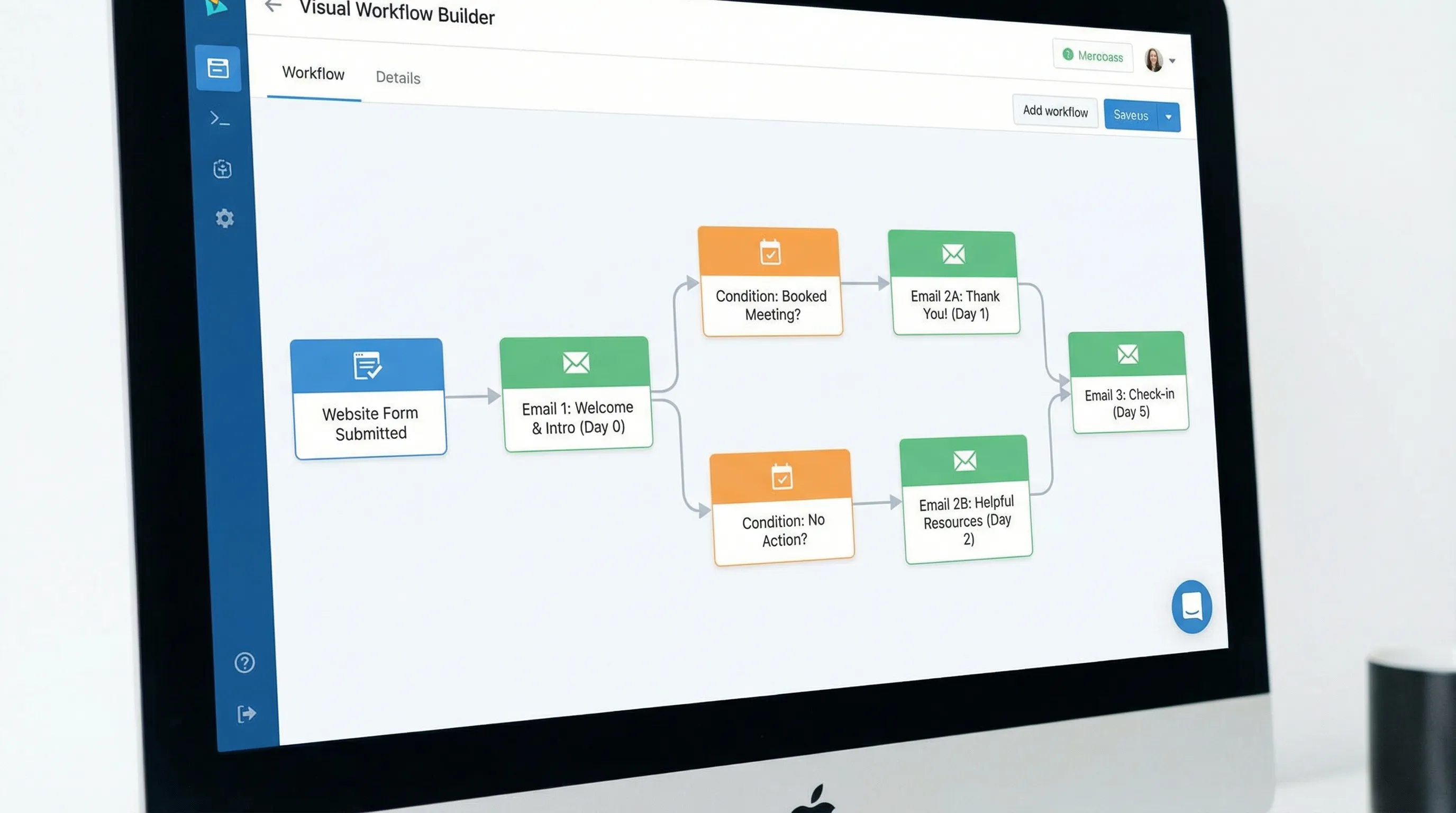
Flow 1: The “new lead” welcome and expectation-setting flow
Trigger: A contact form submission, lead magnet download, or “contact sales” request.
Goal: Confirm the inquiry, set expectations, and get the next micro-commitment (reply, book a call, share details).
What to send (typical structure):
- Email 1 (immediate): Confirmation + what happens next
- Email 2 (next day): The fastest path to a useful first conversation (what to prepare, common pitfalls)
- Email 3 (2 to 4 days later): Proof and relevance (case example, before/after, short insight)
Best-practice notes:
- Write like a human, not a workflow. “Got it, here’s what happens next” beats “Thank you for your interest.”
- Add a single question that makes replying easy, for example: “What system are you using today?” or “Which service area matters most?”
Primary KPIs: reply rate, meeting booked rate, and time-to-first-response.
Flow 2: Lead nurture for “not ready yet” prospects
Trigger: Lead captured, but no meeting booked, no reply, or not sales-qualified.
Goal: Stay top-of-mind and move the buyer from problem-aware to solution-ready.
What to send: 4 to 8 emails over 2 to 6 weeks, each focused on one obstacle:
- Clarify the problem (symptoms, hidden costs)
- Explain your approach (process, timeline, what success looks like)
- Provide evidence (mini case study, quantified outcomes when possible)
- Handle objections (budget, switching cost, internal buy-in)
- Invite a low-friction next step (15-minute assessment, checklist, benchmark)
Best-practice notes:
- Keep emails skimmable. One idea per email, one call-to-action.
- Use behavioral branching only when you have enough volume. Otherwise, write one strong sequence first, then split by use case later.
Primary KPIs: lead-to-meeting conversion, click-to-open rate trends, and unsubscribe rate.
Flow 3: “Booked meeting” pre-call ramp-up
Trigger: Meeting scheduled (Calendly/CRM booking).
Goal: Reduce no-shows and increase call quality so you close faster.
What to send:
- Email 1 (instant): Calendar confirmation + agenda + link to reschedule
- Email 2 (24 hours before): 2 to 3 questions to prepare (and a simple reply request)
- Email 3 (1 to 2 hours before): Quick reminder with meeting link and the promised agenda
Best-practice notes:
- A reschedule link can increase show rate because it prevents silent no-shows.
- Ask for one concrete input (website URL, current ad spend range, service area, top priority). That single detail makes the call feel “custom.”
Primary KPIs: show rate, sales cycle length, close rate.
Flow 4: “Proposal sent” follow-up (the most overlooked revenue flow)
Trigger: Proposal/quote delivered.
Goal: Create momentum, answer objections proactively, and avoid deal drift.
What to send (over 7 to 14 days):
- Email 1 (same day): Summary of what they are buying and what happens after approval
- Email 2 (2 to 3 days later): “Common questions” answered (scope, timeline, responsibilities)
- Email 3 (5 to 7 days later): Proof aligned to their use case (relevant example)
- Email 4 (final): Clear decision request with two paths (approve, or tell us it’s a “not now”)
Best-practice notes:
- Keep language neutral and helpful. Avoid desperation. The goal is clarity.
- If your sales team also follows up manually, keep the automation supportive, not noisy.
Primary KPIs: proposal-to-close rate, time from proposal to decision.
Flow 5: Customer onboarding and “first value” activation
Trigger: Contract signed, invoice paid, trial started, or project kickoff scheduled.
Goal: Get the customer to first value quickly. In B2B, retention starts on day one.
What to send:
- Email 1: Welcome + next steps + roles (who does what)
- Email 2: What “good input” looks like (assets, access, deadlines)
- Email 3: Your process and timelines (reduce anxiety, increase trust)
- Email 4: First milestone achieved + what’s next
Best-practice notes:
- Use onboarding emails to reduce back-and-forth. If a customer needs to deliver assets, list them plainly.
- If you operate in both Norway and the US, include timezone clarity and response-time expectations.
Primary KPIs: time-to-first-value, onboarding completion, early churn (or early project delays).
Flow 6: Re-engagement for cold leads and inactive subscribers
Trigger: No opens/clicks for X days, no site visits, no replies, or stalled pipeline.
Goal: Either re-activate interest or clean your list to protect deliverability.
What to send:
- Email 1: Simple check-in with a specific offer (updated benchmark, new guide, quick audit)
- Email 2: Preference email (choose topics, frequency, or pause)
- Email 3: Breakup email (“Should I close your file?”) with one-click interest
Best-practice notes:
- A smaller, engaged list often outperforms a large unresponsive one.
- If a contact stays inactive, suppress them. This helps your sender reputation.
Primary KPIs: reactivation rate, spam complaints, inbox placement trends.
Flow 7: Renewal, review, and expansion (for retainers, subscriptions, or long-term clients)
Trigger: 90/60/30 days before renewal, or a project milestone.
Goal: Make the renewal decision obvious, and surface expansion opportunities based on results.
What to send:
- “Results recap” email (what happened, what it means)
- “Next quarter plan” email (what you recommend and why)
- “Decision timeline” email (when renewal needs to be confirmed)
Best-practice notes:
- Focus on outcomes, not activity. “We launched 12 ads” is weaker than “We increased qualified leads by improving search intent match.”
- Expansion offers should match behavior. If they are winning on Google Search, your next step might be landing page testing, SEO content, or retargeting, not a random channel.
Primary KPIs: retention rate, expansion rate, customer satisfaction signals (reply sentiment, meeting acceptance).
Flow 8: Referral and review capture (especially strong for local businesses)
Trigger: Positive milestone (project win, high satisfaction score, successful delivery).
Goal: Turn customer happiness into pipeline.
What to send:
- Referral ask email with clear framing (who you can help, what to introduce)
- Review request email (platform depends on your market)
Best-practice notes:
- Make the referral ask specific: “Do you know another [industry] team struggling with [problem]?”
- Ask at the moment of value, not weeks later.
Primary KPIs: referrals generated, review conversion rate.
Quick reference: core flows, triggers, and what to measure
| Flow | Trigger | Primary goal | What to measure |
|---|---|---|---|
| New lead welcome | Form submit / download | Move to reply or meeting | Reply rate, meeting booked rate |
| Lead nurture | No meeting yet | Build readiness and trust | Lead-to-meeting conversion |
| Pre-call ramp-up | Meeting booked | Reduce no-shows | Show rate |
| Proposal follow-up | Proposal sent | Prevent deal drift | Proposal-to-close, time-to-decision |
| Onboarding / activation | Customer start | Reach first value fast | Time-to-first-value |
| Re-engagement | Inactivity | Reactivate or suppress | Reactivation, complaints |
| Renewal / expansion | Renewal window | Retain and grow | Retention, expansion |
| Referral / reviews | Positive milestone | Generate new pipeline | Referrals, reviews |
How to prioritize if you have limited time
If you can only build two flows this month, build:
- New lead welcome (because speed-to-response and clarity drive bookings)
- Proposal sent follow-up (because it directly affects revenue already in your pipeline)
Then add onboarding (to protect retention) and nurture (to scale).
Tooling: what you actually need (and what you do not)
You do not need an advanced stack to start. You need:
- A place where contacts live (CRM)
- An email platform that supports automation
- A way to pass form data reliably from your website
Choose tools based on your sales motion (hand-raisers vs longer nurture), not based on feature checklists.
One more note: email still tends to be a high-ROI channel when it’s run well. Litmus has reported strong email ROI in its industry research, often cited at $36 returned for every $1 spent (Litmus). Your results will depend on list quality, offer, and execution, but it’s a useful reminder of why automation is worth building.
Where most B2B email automation goes wrong (and how to avoid it)
Too many emails, not enough intent
If someone requested a quote, do not drop them into a generic newsletter. Use a short, purposeful sequence tied to that request.
Measuring opens instead of outcomes
With modern privacy changes, open rate is directionally useful but not definitive. Prioritize meeting booked rate, replies, pipeline velocity, and retention.
Treating the website as separate from automation
Your website is the front door to your automation. If the page does not match the search intent, and the form does not collect useful context, every email after that becomes less relevant.
For local businesses, this is why “just having a site” is not enough. You want an SEO-optimized site that attracts the right prospects, and a form experience that captures the right inputs.
Putting it together for local businesses and B2B teams
Whether you are a B2B services firm in Norway, a local business selling to other companies in the US, or an agency building pipeline, these flows create a simple lifecycle system:
- Convert new interest faster
- Reduce sales leakage (no-shows, stalled proposals)
- Activate customers earlier
- Improve retention and expansion
If you are rebuilding your website this year, it’s a good moment to wire in the basics properly: fast pages, clear service pages, strong calls-to-action, and forms that feed your CRM cleanly. Kvitberg Marketing’s offer is designed around that foundation, providing free, finished, SEO-optimized websites for local businesses to review before deciding to buy, with optional growth services like SEO campaigns and Google Search Ads if you want to scale visibility after the site is live.
The core idea is simple: traffic is only valuable when your systems follow through. Email automation is that follow-through.