Marketing Agency Automation: Build a Lead Gen Machine

Most lead generation “systems” fail for one simple reason: they rely on humans to remember too many steps. One missed follow up, one broken tracking tag, one slow landing page, and your pipeline turns into guesswork.
Marketing agency automation is how you turn lead gen into a predictable machine, where each stage (traffic, capture, qualification, follow up, booking, and reporting) is engineered to run consistently with minimal manual effort.
This guide lays out a practical blueprint you can use whether you are a local business owner who wants more booked calls, or an agency building repeatable delivery for multiple clients.
What “marketing agency automation” actually means (and what it does not)
Automation is not “set it and forget it.” In lead gen, good automation means:
- Fewer handoffs, fewer spreadsheets, fewer copy paste routines
- Faster speed to lead (especially for inbound leads)
- Cleaner data so you can see which channel really produces revenue
- Standardized processes you can reuse across industries and locations
Bad automation is the opposite: complex tools stacked on top of weak fundamentals (unclear offer, slow website, no tracking, no follow up process).
If you want a lead gen machine, the order matters: foundation first, automation second, optimization third.
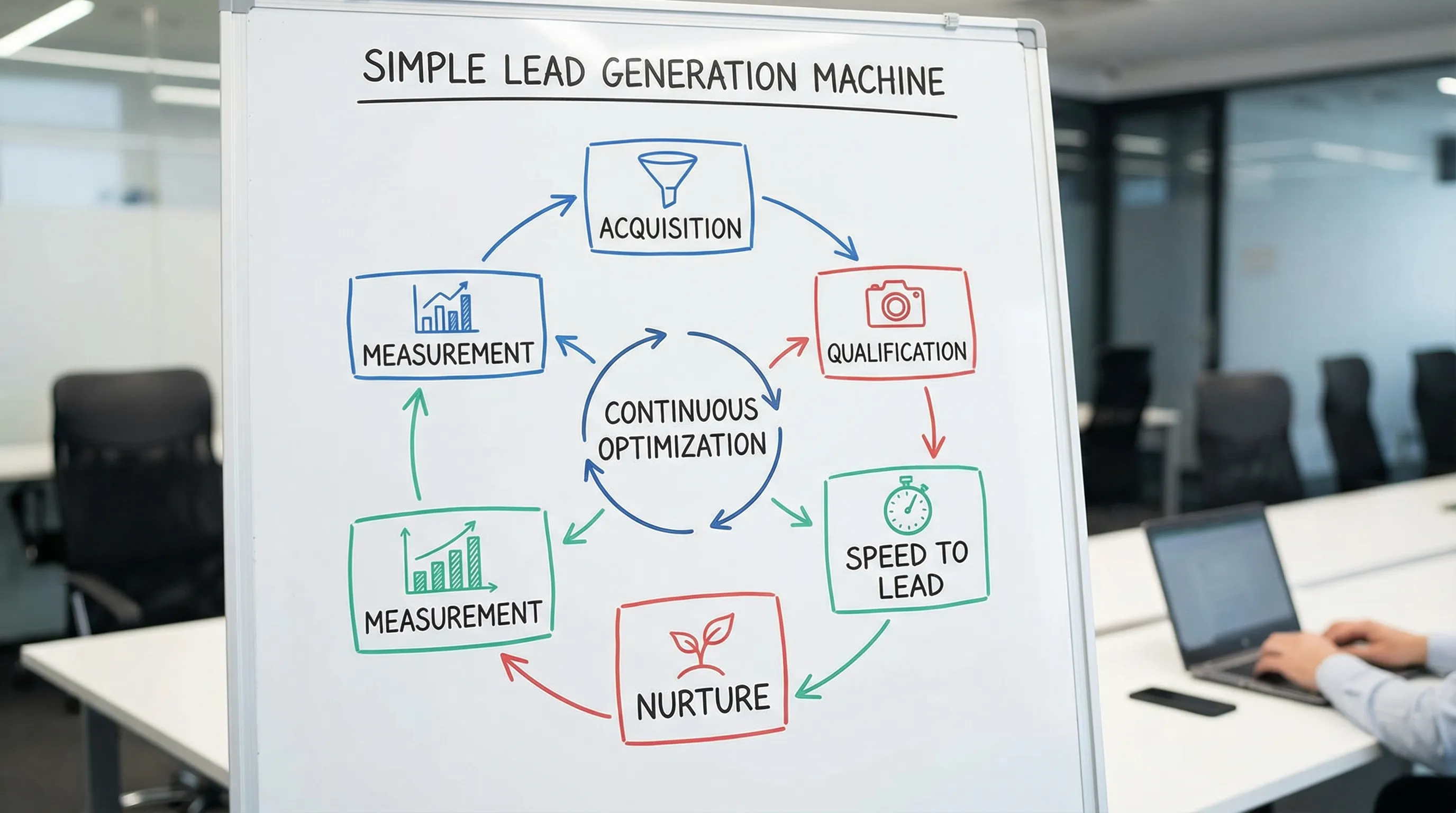
The lead gen machine blueprint
A simple, scalable lead gen machine has six stages:
- Acquisition: you earn or buy attention (SEO, Google Ads, Meta Ads, local listings, partnerships).
- Capture: you turn attention into a lead (landing pages, forms, calls, chat).
- Qualification: you separate real prospects from noise (questions, scoring, filters).
- Speed to lead: you contact fast and consistently (SMS, email, call routing, calendar).
- Nurture: you keep warm leads moving (sequences, reminders, retargeting).
- Measurement: you connect activity to outcomes (tracking, attribution, dashboards).
Here is how that translates into automation, with practical metrics to monitor.
| Stage | Goal | Automation examples | Primary metric |
|---|---|---|---|
| Acquisition | Consistent qualified traffic | Rules for budget pacing, negative keyword routines, automated alerts | Cost per qualified click, impression share |
| Capture | Convert traffic into leads | Form routing, spam protection, dynamic landing page sections | Conversion rate, cost per lead |
| Qualification | Improve lead quality | Auto tagging, lead scoring, required fields, enrichment | Qualified lead rate |
| Speed to lead | Increase contact and booking | Instant SMS/email, auto call tasks, calendar links | Time to first response, contact rate |
| Nurture | Reduce drop off | Drip sequences, retargeting audiences, no show reminders | Booked rate, show up rate |
| Measurement | Make decisions from truth | Offline conversion imports, automated reporting | Cost per booked call, CAC |
Step 1: Build an asset that converts (before you automate traffic)
Automation cannot rescue a weak web foundation.
For most local businesses, the highest leverage “asset” is a fast website (or dedicated landing pages) designed for one job: turn local intent into a call, form submission, or booking.
A conversion focused site typically includes:
- A single, specific promise above the fold (who it is for, what you do, and what happens next)
- Proof (reviews, before and after, case snapshots, certifications)
- Friction removal (clear pricing ranges, financing, service areas, response time expectations)
- One primary call to action (book a call, request quote, schedule)
Where automation fits here
Once your core pages exist, you can automate:
- Lead routing based on service type or location
- Form confirmations and follow up sequences
- Appointment reminders and rescheduling links
At Kvitberg Marketing, one common way businesses reduce time to value is to start with a pre built, professional, SEO optimized website first, then layer on growth services like SEO campaigns or Google Search Ads only after the foundation is live. Importantly, the website build can be delivered without upfront commitment, you review the finished site in a short walkthrough, and only decide to buy if you like the result.
If your situation requires deeper custom functionality (for example, advanced portals, integrations, or real time features), partnering with a specialized engineering team can be the difference between a site and a real system. A relevant option is a custom web application development team that can help when your lead gen workflows need more than standard templates and plugins.
Step 2: Make tracking “automation ready”
Most automation breaks because the data is messy.
Before you build workflows, standardize these basics:
Consistent conversion definitions
Decide what counts as success, and track it reliably:
- Calls (and what duration qualifies)
- Form fills (and which forms matter)
- Booked appointments
- Qualified leads (manual or CRM based)
If you run Google Ads, you will usually want to distinguish between “all leads” and “qualified leads” as separate conversion actions. This helps bidding systems optimize toward what matters.
Clean naming conventions
Use consistent naming across channels, forms, and CRM fields. It sounds boring, but it is how you avoid dashboards that nobody trusts.
Closed loop reporting
If you can, connect outcomes back to the ad click.
Examples include importing offline conversions (like “booked,” “showed,” “closed”) from your CRM back into ad platforms. Even a basic version of this improves optimization decisions dramatically.
Step 3: Automate lead capture and qualification (without killing conversions)
A lead gen machine is not just “get leads.” It is “get the right leads.”
Start with lightweight qualification that does not reduce conversion rates too much:
- Service selection (dropdown)
- Location or ZIP
- Timeline (now, soon, researching)
- Budget range (optional depending on the industry)
Then automate what happens next:
- Route leads to the right person (sales, service manager, location)
- Tag by source (Google Ads, SEO, Meta)
- Trigger the correct follow up sequence
Spam and low quality lead controls
If you advertise heavily, you will see spam. Build simple guardrails:
- Use modern spam protection on forms
- Block obvious junk with filters (but do not over filter)
- Require at least one high intent field (service type, city)
Step 4: Win with speed to lead automation
In local services, speed to lead is often the easiest lever.
A strong baseline workflow looks like this:
- Instant confirmation message (email or SMS) that sets expectations and gives next steps
- A short follow up that encourages booking (calendar link or “reply with your availability”)
- Internal notification with the lead summary and recommended response script
- If no response, an automatic “second touch” later the same day
If you do nothing else, do this. It is the core of the machine.
Step 5: Add nurture that feels human (and stays compliant)
Most leads are not ready right now. A good nurture system keeps your brand present without being annoying.
Effective nurture assets include:
- A 5 to 10 day follow up sequence that answers common questions
- Proof packs (reviews, short case highlights, process explanation)
- Retargeting audiences for site visitors and unbooked leads
Personalization matters. Even basic segmentation (service type, city, urgency) is often enough to make messages feel relevant.
If you operate in Norway or target EU customers, keep privacy and consent in mind. Make sure your forms and messaging flows match applicable rules, and align with your CRM and email provider policies.
Step 6: Automate ads, but keep strong guardrails
Performance marketing platforms already automate a lot. The win is not “more automation,” it is “automation that is constrained by good strategy.”
Practical examples:
Google Search Ads
- Use tightly themed campaigns for high intent keywords
- Maintain negative keywords weekly (this can be a scheduled task, not a manual mystery)
- Use ad schedules if your team cannot answer leads 24/7
Meta Ads
- Build creatives around proof and outcomes, not generic branding
- Send cold traffic to dedicated landing pages, not a homepage
- Retarget visitors and engaged users with booking focused offers
Automation is most powerful when it protects you from waste (budget pacing, alerts, exclusion lists) and amplifies what works (audience building, bidding toward qualified conversions).
Step 7: Reporting automation that drives decisions (not vanity)
A lead gen machine needs a scoreboard.
At minimum, report weekly on:
- Leads by channel
- Cost per lead
- Qualified lead rate
- Booked calls
- Show up rate
- Cost per booked call
If you can add one advanced metric, make it cost per acquired customer (or cost per closed deal). That is the number that keeps marketing aligned with revenue.

Common mistakes that stop automation from working
Automating a weak offer
If your offer is unclear, automation will just create faster confusion. Fix positioning and your main call to action first.
Too many tools too early
A simple stack that is used consistently beats a complex stack that nobody maintains.
Optimizing for leads instead of outcomes
If your CRM says only 20 percent of leads are real, do not scale lead volume. Scale quality and bookings.
No owner for the system
Automation requires ownership. Someone must review workflows, fix broken zaps, update routing rules, and monitor performance.
A practical implementation plan (30 days)
Use this as a realistic rollout, without boiling the ocean.
| Timeline | Focus | Deliverables |
|---|---|---|
| Week 1 | Foundation | Offer clarity, landing page or site improvements, conversion tracking plan |
| Week 2 | Capture and routing | Forms, call tracking, lead routing, tags and source fields |
| Week 3 | Speed to lead | Instant follow up, internal notifications, booking flow, missed lead logic |
| Week 4 | Nurture and measurement | Nurture sequence, retargeting audiences, weekly reporting, optimization cadence |
Once these are live, you can safely scale traffic, because the machine can actually handle it.
Frequently Asked Questions
What is marketing agency automation in lead generation? Marketing agency automation is the use of systems and workflows to reliably move prospects from click to lead to booked call, with tracking and follow up handled consistently.
Do I need a CRM to automate lead gen? A CRM helps a lot, especially for qualification and reporting, but you can start with basic routing and follow up automation and add a CRM once volume increases.
What is the most important automation for local businesses? Speed to lead automation, instant confirmations, follow up, and booking workflows usually create the fastest lift in booked appointments.
Can automation help if my website is not converting? Not much. Fix the website or landing page first (message, proof, call to action, load speed), then automate capture and follow up.
How do I measure lead quality, not just lead volume? Track qualified leads and booked calls as separate conversion events, ideally tied to CRM outcomes like “showed” or “closed.”
Build your lead gen machine without guessing
If you want a predictable pipeline, start with a foundation you can trust: a professional website built to convert, SEO optimized from day one, and a follow up system that does not rely on memory.
Kvitberg Marketing builds high quality, pre built websites for local businesses with no upfront commitment, then you review the finished site and only buy if you like the result. If you want to grow beyond the website, you can add SEO campaigns or Google Search Ads management.
Explore options and submit an inquiry at Kvitberg Marketing.